 Audio, video & image batch studio
Reelcraft
Audio, video & image batch studio: cut, convert, compress, subtitle, reframe
Reelcraft turns twenty usefulweb media tools into one workspace. Collect clips, recordings, photos, subtitles and SVGs in a local library, chain the tools into recipes, and run them over many files with a queue that respects the rate limit, retries and keeps every result on your device. Delivery checks for Reels, podcasts, e-mail or web images, A/B comparisons, loudness and privacy findings, a release calendar and a printable report show what is ready to publish.

Screenshots
- Library, recipe editor and inspector
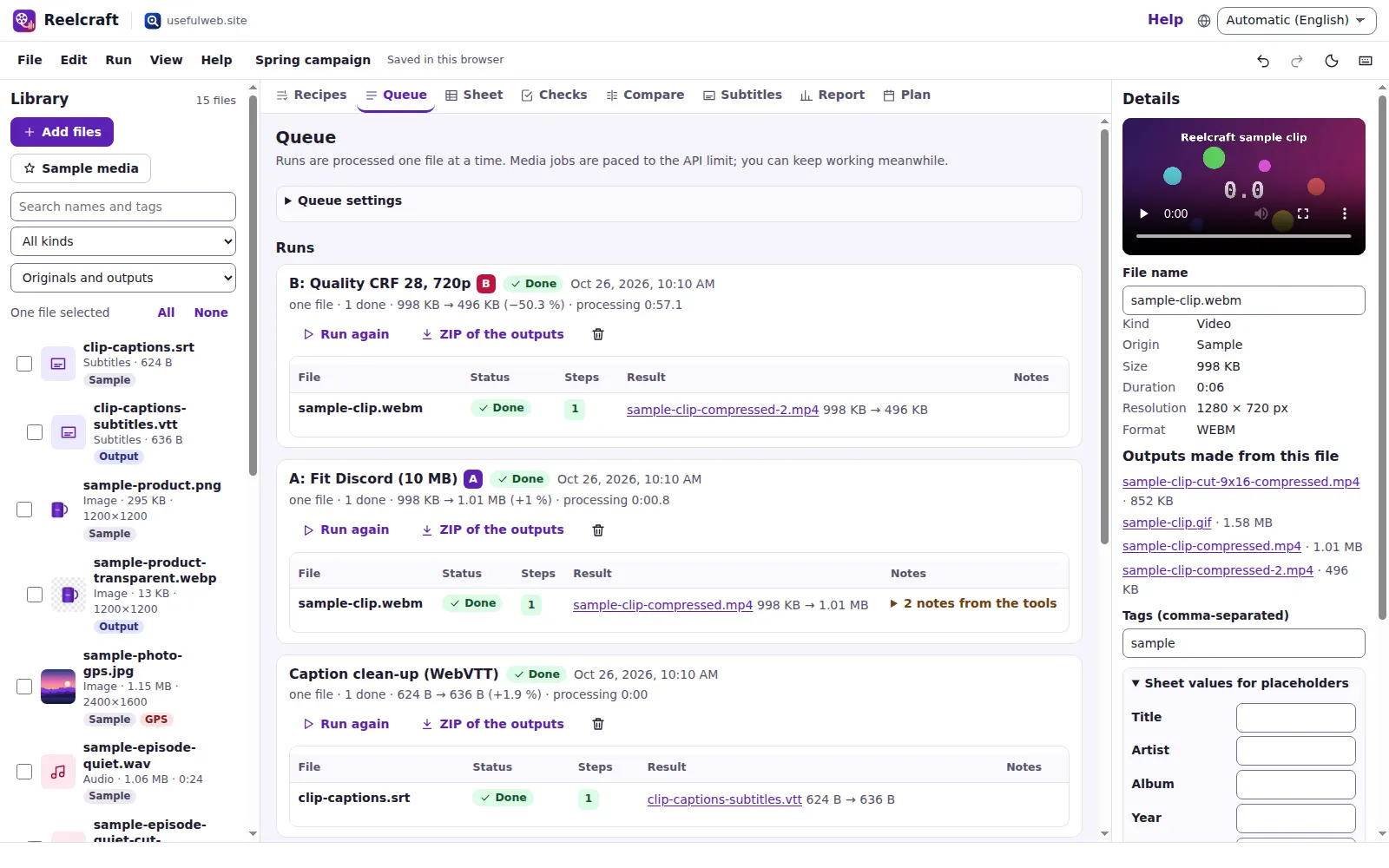 Batch queue with rate-limit pacing and run history
 Delivery checks against platform presets
 A/B variants side by side
 Consolidated report with findings and charts
 Phone layout
Features
Local media library
Drop in video, audio, photos (incl. HEIC and RAW), subtitles and SVG. Reelcraft reads duration and size in the browser, keeps files in IndexedDB and shows every output next to the file it came from.
Recipes that chain 20 tools
Cut → reframe → compress, or trim → normalise → tag: build a recipe from the media tools and Reelcraft checks that each step can read what the previous one produces.
Batch queue that respects limits
Run a recipe over many files. The queue paces media jobs to the API limit, waits on “too many requests”, retries network errors, pauses offline and never blocks your typing.
Per-file sheet & placeholders
Give every file its own title, artist, track, start and end time or credit — typed or pasted from a spreadsheet — and use {{title}} or {{start}} in any step.
Delivery checks
Check results against presets for Reels/Shorts, feed video, e-mail, WhatsApp, Discord, podcasts, streaming, broadcast, web images and subtitles — or your own specs.
A/B variants and run history
Run two recipes on the same files and compare size, resolution, duration, loudness and warnings side by side. Every run is logged with settings, timings and sizes, so you can see what a change of settings did.
Shot logger
Play a library video, mark frames and write a note for each shot; marks are saved with the video in the project. Jump back to any shot and download the shot list as a printable HTML page with thumbnails or as CSV.
Loudness board
Integrated LUFS and true peak before and after normalising, against the target, plus a consistency verdict for a whole season of episodes.
Privacy & provenance sweep
Find photos that reveal a GPS location and files that carry C2PA Content Credentials or AI-generation claims — then clean them with one recipe.
Subtitle desk
Edit SRT/VTT captions next to the video, then shift, re-sync, wrap, fix overlaps and check reading speed with the subtitle tool.
Outputs kept on your device
Results are fetched right away (server copies expire after about two hours), previewed in place and downloaded one by one or as a ZIP.
Consolidated report
Findings in plain sentences, a before/after size chart, check matrix and run table — print it to PDF or export CSV, JSON, SVG and PNG.
Release plan with reminders
Schedule what goes where and when, linked to files and specs, and export the plan as an .ics calendar with a reminder the day before.
Hand files to other apps
Send any video, audio or image to another premium app (for example to Lumina for retouching) and receive files from them — nothing is uploaded.
Projects, links and Drive
Autosave, recent projects, undo/redo, project files, share links for recipes and checks, Google Drive save and six ready-made templates.
Same tools for scripts and agents
Every step is a documented usefulweb tool with JSON API and MCP; the project format is a published JSON schema.


Templates
Start from a ready-made project and change it to fit.
Podcast season mastering
Trim, normalise to −16 LUFS and tag a whole season of episodes in one batch, then check loudness consistency.
Vertical social clips
Cut a highlight, reframe it to 9:16 with a blurred background, make a GIF teaser and clean up the captions.
Product photo pack
Remove plain backgrounds, square-crop, watermark and compress product shots, and optimise the brand SVG.
Privacy-safe photo sharing
Find photos that reveal GPS locations or carry Content Credentials, then convert, strip and shrink them for sharing.
Lecture to podcast and captions
Turn recorded lectures into a normalised podcast edition and a 720p web video, and clean up the captions.
Send a video by e-mail or chat
Compare size-targeted and quality-based compression side by side and keep the variant that fits the limit.
Built-in tools
Reelcraft uses these tools. Each one also has its own page and works on its own, in the browser, through the JSON API and through MCP.
- Video Cutter & MergerTrim video, remove a section or join clips: lossless copy or frame-exact re-encode.
- Universal Video ConverterConvert video to MP4, WebM, MOV or MKV: resize, set quality and fps, or remux losslessly.
- Vertical Video ReframerReframe video to 9:16, 1:1, 4:5 or 16:9 by cropping, a blurred background or bars.
- Video CompressorShrink a video to a target size (two-pass) for e-mail, WhatsApp or Discord, or by quality.
- Video to GIF CreatorTurn a video clip into a high-quality GIF or animated WebP with fps, width and dithering.
- Video to MP3 ExtractorExtract a video’s soundtrack as MP3, WAV or FLAC, or copy the original audio losslessly.
- Audio Cutter & MergerTrim audio, keep or remove ranges, fade in/out, or join up to 10 clips with crossfades.
- Audio Loudness NormalizerMeasure LUFS and true peak, then normalise to Spotify, podcast or EBU R 128 targets.
- Universal Audio ConverterConvert MP3, WAV, FLAC, Ogg, Opus, M4A and AIFF with bitrate and sample-rate control.
- MP3 Tag & Cover EditorEdit MP3 ID3 tags (title, artist, album, year…) and add, replace or remove the cover.
- Subtitle StudioConvert SRT, VTT, ASS and SBV; shift, re-sync, fix overlaps, wrap lines and check CPS.
- Background RemoverRemove plain backgrounds from product photos and logos (colour-based, no AI) → transparent PNG.
- Batch Image Resizer & CropperResize or crop up to 30 images at once: exact size, fit, percentage or 1:1, 4:5, 16:9, 9:16.
- Batch Watermark StudioAdd a text or logo watermark to up to 30 images at once: position, tiling, opacity and angle.
- EXIF Inspector & CleanerSee all photo metadata (EXIF, GPS, XMP, IPTC, MakerNotes) and download a cleaned copy.
- HEIC/RAW Image ConverterConvert iPhone HEIC, AVIF and camera RAW (CR2, CR3, NEF, ARW, DNG…) to JPG, PNG or WebP.
- Image CompressorShrink JPG, PNG, WebP, AVIF or GIF images: convert, resize, strip metadata and compare sizes.
- Image UpscalerEnlarge images 2×, 3× or 4× with classic Lanczos/Mitchell filters and sharpening (no AI).
- SVG OptimizerShrink and sanitise SVG files: strip editor junk and scripts, round numbers, minify paths.
- C2PA Credentials InspectorRead C2PA Content Credentials in images and videos: actions, AI hints, signer and signature.
For AI agents
Reelcraft runs on a deterministic engine. The same functions are available as tools with a JSON API and MCP, so scripts and AI agents get exactly the results the app shows.
- Video Cutter & Merger – Trim video, remove a section or join clips: lossless copy or frame-exact re-encode.
Tool page ·POST https://reelcraft.usefulweb.app/api/v1/tools/video-cutter-merger/calculate· MCPvideo_cutter_merger - Universal Video Converter – Convert video to MP4, WebM, MOV or MKV: resize, set quality and fps, or remux losslessly.
Tool page ·POST https://reelcraft.usefulweb.app/api/v1/tools/video-converter/calculate· MCPvideo_converter - Vertical Video Reframer – Reframe video to 9:16, 1:1, 4:5 or 16:9 by cropping, a blurred background or bars.
Tool page ·POST https://reelcraft.usefulweb.app/api/v1/tools/vertical-video-reframer/calculate· MCPvertical_video_reframer - Video Compressor – Shrink a video to a target size (two-pass) for e-mail, WhatsApp or Discord, or by quality.
Tool page ·POST https://reelcraft.usefulweb.app/api/v1/tools/video-compressor/calculate· MCPvideo_compressor - Video to GIF Creator – Turn a video clip into a high-quality GIF or animated WebP with fps, width and dithering.
Tool page ·POST https://reelcraft.usefulweb.app/api/v1/tools/video-to-gif-creator/calculate· MCPvideo_to_gif_creator - Video to MP3 Extractor – Extract a video’s soundtrack as MP3, WAV or FLAC, or copy the original audio losslessly.
Tool page ·POST https://reelcraft.usefulweb.app/api/v1/tools/video-to-audio-extractor/calculate· MCPvideo_to_audio_extractor - Audio Cutter & Merger – Trim audio, keep or remove ranges, fade in/out, or join up to 10 clips with crossfades.
Tool page ·POST https://reelcraft.usefulweb.app/api/v1/tools/audio-cutter-merger/calculate· MCPaudio_cutter_merger - Audio Loudness Normalizer – Measure LUFS and true peak, then normalise to Spotify, podcast or EBU R 128 targets.
Tool page ·POST https://reelcraft.usefulweb.app/api/v1/tools/audio-loudness-normalizer/calculate· MCPaudio_loudness_normalizer - Universal Audio Converter – Convert MP3, WAV, FLAC, Ogg, Opus, M4A and AIFF with bitrate and sample-rate control.
Tool page ·POST https://reelcraft.usefulweb.app/api/v1/tools/audio-converter/calculate· MCPaudio_converter - MP3 Tag & Cover Editor – Edit MP3 ID3 tags (title, artist, album, year…) and add, replace or remove the cover.
Tool page ·POST https://reelcraft.usefulweb.app/api/v1/tools/mp3-tag-cover-editor/calculate· MCPmp3_tag_cover_editor - Subtitle Studio – Convert SRT, VTT, ASS and SBV; shift, re-sync, fix overlaps, wrap lines and check CPS.
Tool page ·POST https://reelcraft.usefulweb.app/api/v1/tools/subtitle-studio/calculate· MCPsubtitle_studio - Background Remover – Remove plain backgrounds from product photos and logos (colour-based, no AI) → transparent PNG.
Tool page ·POST https://reelcraft.usefulweb.app/api/v1/tools/background-remover/calculate· MCPbackground_remover - Batch Image Resizer & Cropper – Resize or crop up to 30 images at once: exact size, fit, percentage or 1:1, 4:5, 16:9, 9:16.
Tool page ·POST https://reelcraft.usefulweb.app/api/v1/tools/batch-image-resizer/calculate· MCPbatch_image_resizer - Batch Watermark Studio – Add a text or logo watermark to up to 30 images at once: position, tiling, opacity and angle.
Tool page ·POST https://reelcraft.usefulweb.app/api/v1/tools/batch-watermark-studio/calculate· MCPbatch_watermark_studio - EXIF Inspector & Cleaner – See all photo metadata (EXIF, GPS, XMP, IPTC, MakerNotes) and download a cleaned copy.
Tool page ·POST https://reelcraft.usefulweb.app/api/v1/tools/exif-inspector-cleaner/calculate· MCPexif_inspector_cleaner - HEIC/RAW Image Converter – Convert iPhone HEIC, AVIF and camera RAW (CR2, CR3, NEF, ARW, DNG…) to JPG, PNG or WebP.
Tool page ·POST https://reelcraft.usefulweb.app/api/v1/tools/heic-raw-converter/calculate· MCPheic_raw_converter - Image Compressor – Shrink JPG, PNG, WebP, AVIF or GIF images: convert, resize, strip metadata and compare sizes.
Tool page ·POST https://reelcraft.usefulweb.app/api/v1/tools/image-compressor/calculate· MCPimage_compressor - Image Upscaler – Enlarge images 2×, 3× or 4× with classic Lanczos/Mitchell filters and sharpening (no AI).
Tool page ·POST https://reelcraft.usefulweb.app/api/v1/tools/image-upscaler/calculate· MCPimage_upscaler - SVG Optimizer – Shrink and sanitise SVG files: strip editor junk and scripts, round numbers, minify paths.
Tool page ·POST https://reelcraft.usefulweb.app/api/v1/tools/svg-optimizer/calculate· MCPsvg_optimizer - C2PA Credentials Inspector – Read C2PA Content Credentials in images and videos: actions, AI hints, signer and signature.
Tool page ·POST https://reelcraft.usefulweb.app/api/v1/tools/c2pa-credentials-inspector/calculate· MCPc2pa_credentials_inspector
- MCP endpoint (Streamable HTTP):
https://reelcraft.usefulweb.app/mcp - Project file format (JSON Schema): https://reelcraft.usefulweb.app/project.schema.json
- OpenAPI description: /openapi.json · llms.txt · API & MCP
Build a project through the API, then open it in the app with a link to https://reelcraft.usefulweb.app/app#project=<base64url JSON>.
Import & export
Import
- Video: MP4, MOV, MKV, WebM, AVI, MPEG-TS and more
- Audio: MP3, WAV, FLAC, Ogg/Opus, M4A, AIFF
- Images: JPEG, PNG, WebP, AVIF, GIF, TIFF, HEIC and camera RAW
- Subtitles: SRT, WebVTT, ASS/SSA, SBV
- SVG
- Per-file sheet as CSV
- Reelcraft project (.reelcraft.json)
- Project link (#project=…)
Export
- Processed media files (single files or ZIP)
- Reelcraft project (.reelcraft.json)
- Report (print to PDF)
- CSV: library, checks, runs and sheet
- Release plan (.ics calendar)
- Size chart (SVG, PNG)
- Share link for recipes and checks
Keyboard shortcuts
| Keys | Action |
|---|---|
| Ctrl + O | Open project file |
| Ctrl + S | Save project file |
| Ctrl + Z / Ctrl + Y | Undo / redo |
| Ctrl + I | Add media files |
| Ctrl + Enter | Run the selected recipe on the selected files |
| 1 … 8 | Switch view: recipes, queue, sheet, checks, compare, subtitles, report, plan |
| / | Search the library |
| Delete | Remove the selected files (in the library list) |
| Ctrl + A | Select all files (in the library list) |
| P | Pause or resume the queue |
| ? | Keyboard shortcuts |
Frequently asked questions
Are my files uploaded?
Your library stays in your browser (IndexedDB). A file is sent to the usefulweb server only when you run a tool step on it — processed in a private temporary folder and deleted afterwards — and the result is downloaded back into your library right away.
Why does a big batch take a while?
The media tools allow about six jobs per minute per visitor. Reelcraft paces the queue to that limit, shows how long it will at least take, and continues automatically after “too many requests” answers instead of failing.
What is in a project file or a share link?
Recipes, per-file sheet values, delivery checks, run history, the release plan, subtitles and small SVGs. Video, audio and photo files are not included; when you open the project elsewhere, add the files again and Reelcraft relinks them by name.
How accurate are the delivery checks?
Each check compares facts that Reelcraft or a tool measured (size, duration, resolution, format, LUFS, true peak, GPS, reading speed) with the spec. The presets reflect commonly published limits; platforms change their rules, so every value is editable.
Does the background remover or upscaler use AI?
No. Both are classic image processing: the background remover keys out a plain colour, the upscaler uses Lanczos/Mitchell filters with sharpening. Reelcraft says so where you choose them.
Can an AI agent use Reelcraft?
Yes. All steps are usefulweb tools with JSON API and MCP on this host, and the project format is documented at /project.schema.json, so an agent can write recipes and checks and open them here with a #project= link.
What happens if a step fails?
The file is marked as failed with the tool’s explanation; the other files continue. Retry failed files from the queue once you have changed the recipe or the sheet.
Where are shot logger marks saved?
With the video in your project: each mark stores its time and your note, so marks survive autosave, project files, share links and Google Drive, and Ctrl+Z undoes them. Thumbnails are made from the video file in your browser and are not stored in the project. Playback uses your browser’s video decoder, so formats it cannot play (for example ProRes) need converting first — a recipe with the Universal Video Converter step can do that.
Limitations
What Reelcraft does not do (yet):
- Processing runs on the usefulweb server through the media tools: it needs a connection, and the API allows about six media jobs per minute.
- Upload limits per file follow the tools: 250 MB for video, 100 MB for audio, 30–50 MB for images.
- There is no timeline editor with tracks, transitions or titles; cutting is by start and end times.
- Previews depend on your browser: some formats (for example HEVC, MKV, RAW, HEIC) can be processed but not played or shown in every browser.
- Project files and links do not contain the media files themselves.
- Delivery presets are starting points; Reelcraft does not log in to or upload to any social platform.
- The shot logger plays only formats your browser can decode (typically MP4/H.264 and WebM) and needs the video file in this browser; thumbnails are re-made from the file and are not part of shared projects.
Tutorials
Learn Reelcraft step by step.
- Your first batch in 5 minutesAdd a few files, pick a ready-made recipe, run it on the whole selection and download the results as a ZIP. Nothing to install, no account.Beginner 5 min
- Recipes and per-file values with the SheetBuild a three-step podcast recipe, fill titles and cut points for each episode in the Sheet and let placeholders like {{title}} carry them into the tools.Intermediate 10 min
- The queue, rate limits and retriesHow Reelcraft paces media jobs to the API limit, what happens on errors or when you go offline, and how to retry only the files that failed.Intermediate 6 min
- Delivery checks and A/B variantsCheck every output against platform specs like vertical shorts, Discord uploads or podcast loudness, and compare two recipes side by side to keep the variant that fits.Intermediate 8 min
- Subtitles, privacy findings and the reportEdit and preview captions on your video, find photos that reveal GPS locations or carry Content Credentials, and print a report with findings and charts.Beginner 8 min
- Release plan, other apps and automationPlan which file goes where and when, export the plan to your calendar, hand files to other usefulweb apps and run the same tools from scripts or AI agents.Advanced 7 min
- Log shots in a videoMark frames of a library video with the Shot logger, write a note for each shot, jump back to it and download the shot list as a printable page or CSV.Beginner 5 min
Ready to try it?
Other premium apps
-

Kerfwise
Cabinet & furniture CAD
Design cabinets and furniture, get cut lists, optimised sheet layouts, costs and drawings.
-

Kinetica
Robot motion studio
Simulate robot arms in your browser: kinematics, trajectories, collisions, program export.
-

Threadsmith
Embroidery digitizing studio
Draw or import artwork, turn it into stitches, export DST, PES, JEF or EXP files.
-

Ohmforge
Virtual electronics workbench
Draw a circuit, switch it on, and measure it with real-feeling bench instruments.
-

Twinworks
Factory digital twin & production simulation
Model a production line, simulate it and find the bottleneck — free, in your browser.
-

Agentlab
AI-agent & LLM workbench
Test an AI agent before release: permissions, traces, costs, citations and output checks.
-

Bundlekeep
Local project backup
Back up projects from every usefulweb app into one file, check it and restore any part.
-

Chainscope
Web3 investigation desk
Investigate transactions, bridges, contracts, DAOs and wallets in one case file.
-

Chartroom
Data & charts studio
Import data, chart it, run analyses and publish a report — one workspace, free.
-

Fieldday
Sports club & training organiser
Fixtures, brackets, ratings and training plans for your club — in one workspace.
-

Flipline
Drawing, storyboards & animation
A few drawings. A little life. Make a flipbook in your browser.
-

Hearth
Home & travel planner
Plan meals, chores, home care, a move and trips for your whole household in one place.
-

Keysmith
Crypto & secrets lab
Audit certificates, keys, TLS and passwords in one lab; secrets stay on your device.
-

Ledgerly
Household finance & life-admin desk
Budgets, bills, subscriptions, loans, contracts and deadlines on one private desk.
-

Lumina
Photo editor & image toolkit
Bring out what you saw. A free photo studio, right in your browser.
-

OBSCURIQ
OSINT case desk
Organize public-source research: cases, a research log, pivots and indicators.
-

Opsdeck
Developer & ops workbench
One deck for CI failures, cron, traces, k8s events, API diffs, query plans and Terraform.
-

Pageboard
Website inspiration boards
Collect website references, sort them with tags and arrange them on a moodboard.
-

Panelcraft
Comic books & figure references
Shape a page. Arrange a book. Give your story a voice.
-

Paperwell
Document studio: PDFs, OCR, redaction, forms & contract reading
Your paperwork in one dossier: PDF tools, OCR, redaction, forms and contract reading.
-

Proofline
Math notebook
Solve, graph, test and visualise in one notebook — with data, findings and a report.
-

Provenance
Software supply-chain security desk
SBOMs, CVEs, containers and licences in one risk register — free, in your browser.
-

RavingDesk
Paper trading workspace
Practise trading on paper: orders, ledger, risk, exposure and journal. No real money.
-

Renderloom
3D scene & material studio
Shape a scene. Find its light. Keep every idea editable.
-

Signalhouse
Website & internet infrastructure inspector
Inspect DNS, TLS, mail, CDN and routing of all your domains — and see what changed.
-

Tonegrid
Tone matrix & beat sequencer
Light up squares to build looping melodies and beats, then arrange them into songs.